Shooting Archery
- 4.7
- Rating
- 100.00M
- Installs
- Free
- Price

 Analysis by App-foxy
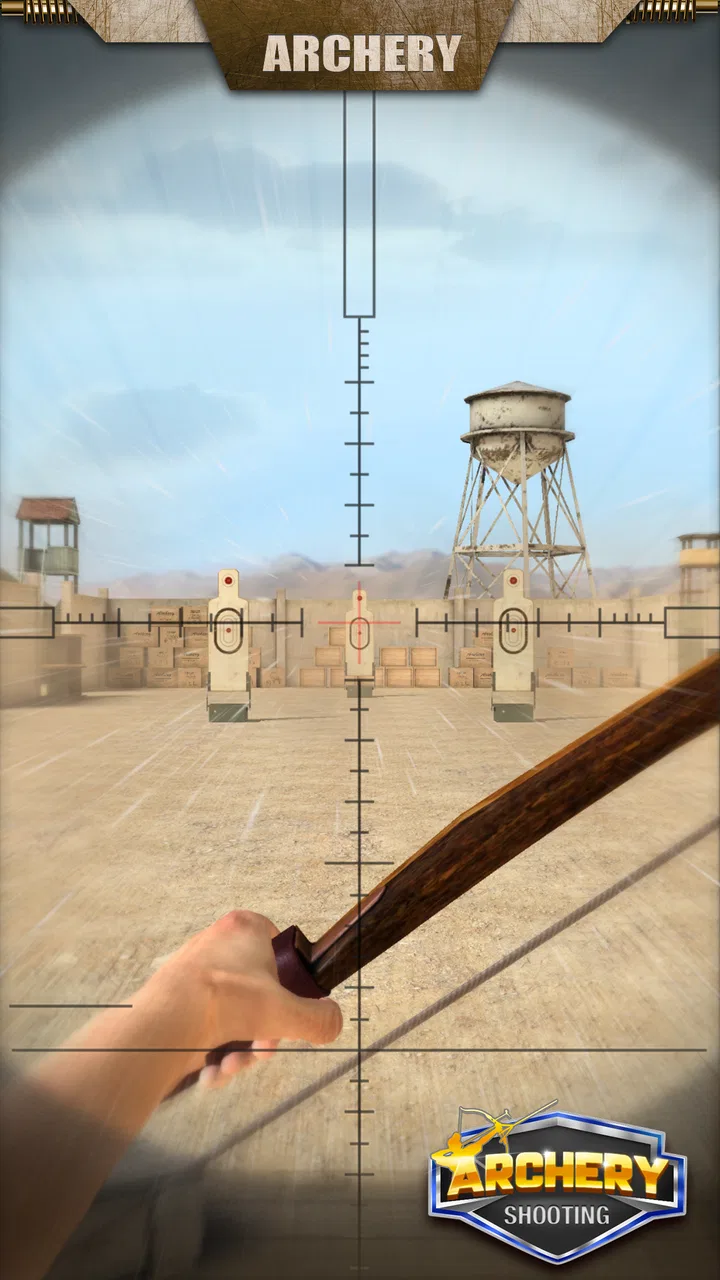
I found Shooting Archery easy to understand within a few seconds, but not quite as simple to master. It is a free sports game built around aiming, drawing, and releasing arrows at targets, with enough variety in bows, arrows, and target situations to make short sessions feel worthwhile. I like it most as a quick focus game: something I can open while waiting, play with one hand, and put down without needing to remember a complicated story or control scheme.
The game comes from PopStoneGameTechnologyLimited-Shooting and has clearly reached a large audience, with over 100 million installs and a 4.7 average from around 835 thousand ratings. Those numbers do not automatically make it perfect, but they do match my impression that the basic idea is immediately approachable. It is free to start, rated for Everyone, and runs on Android versions from 7.0 onward. Optional purchases range from $0.99 to $4.99 per item, so I would still check the purchase settings before handing the phone to a child.
Getting past the first points of friction
The first place I would expect a new player to get stuck is not the concept of archery itself. The controls are familiar, yet small changes in finger position, release timing, and the way the phone is held can make an otherwise good shot miss. On a larger screen, my hand sometimes covered part of the aiming area, while a cramped grip made it harder to make a smooth adjustment. That is a physical setup issue rather than a sign that the game is unresponsive.
You May Also Like

 AccuWeather: Weather Radar
AccuWeather Review: A Quick, Clear Forecast for Everyday Decisions
For everyday plans, the best forecast is the one you can understand quickly. AccuWeather makes rain timing, radar, and local conditions easy to act on, with a few trade-offs.

 Hill Climb Racing
Why Hill Climb Racing Still Turns Crashes Into One More Run
A tiny car, a bumpy hill and one more upgrade: Hill Climb Racing keeps resurfacing because its simple chaos makes every near-miss feel personal.

 AliExpress - Shopping App
AliExpress Makes Global Shopping Feel Personal, but Shoppers Bear the Risk
AliExpress turns a global marketplace into a pocket-sized discovery engine. Its reach is useful, its shopping loop compelling, and its trade-offs easy to miss.

 Lords Mobile: Kingdom Wars
Lords Mobile Is a Kingdom-Building Routine, Not a Quick Match
A case-by-case verdict on the building, battles, device demands, and social commitments that make Lords Mobile rewarding for some players and exhausting for others.

 PDF Scanner app - TapScanner
TapScanner Makes Paperwork Easier to Capture, Check, and Share
TapScanner makes scanning with a phone feel less like a rescue operation and more like a dependable step in getting work done. Its capture tools are useful, though not flawless.

 Block Blast!
 Shows How Much a Puzzle Game Can Leave Out
A quiet grid game shows why puzzle players increasingly value instant clarity, repeatable skill and low-pressure play—and where the genre still needs to catch up.
More From Our News Desk
View All News


I had better results when I held the device steady with one hand and used the other for the shot, especially during challenges where a tiny correction mattered. Playing while walking, riding in a car, or sitting in a moving vehicle made the aiming feel less predictable. For this type of game, a stable posture is more useful than a faster finger. If a shot suddenly feels inconsistent, I first stop moving the phone before changing any settings or blaming the game.
Another common stumbling block is expecting every target to reward the same approach. Early shots encourage direct aiming, but later situations can demand patience and a more deliberate release. I found that rushing after a miss usually created a second miss because I was correcting too much. A better routine is to watch the target, make one small adjustment, and release only when the aim has settled. That sounds obvious, but it makes a noticeable difference in a game where a fraction of movement can change the result.
The most useful habit is to treat every miss as a control lesson, not just a failed attempt. If the arrow consistently lands to one side, I make a small correction in that direction instead of dragging across the whole screen. If the result changes from shot to shot, I check my grip and release timing first. This approach keeps the game relaxing rather than turning each round into a frantic attempt to compensate.
Setup checks that save time
Before playing seriously, I would close other demanding apps, make sure the phone has enough battery, and use a clean screen. Finger oils or moisture are surprisingly disruptive when aiming requires a controlled drag. I also prefer a comfortable brightness level rather than the brightest possible display. A target that is easy to see is helpful, but glare can make the screen harder to read and encourage awkward hand movements.
The game is listed as version 3.74, and I would keep it updated through the normal app store process. Updates can be useful for general compatibility, but they are not a cure for every problem. If the game opens normally and only the aim feels difficult, I would look at posture, touch accuracy, and screen condition before reinstalling anything. Reinstalling is a disruptive step, especially for a player who is unsure how progress is handled.
For a child or a casual family device, I would also review purchase controls before play begins. The game itself is free, but optional items cost between $0.99 and $4.99 each. That does not mean a purchase is necessary for enjoying the core activity, yet accidental taps are easier to avoid when the device owner has already secured the store account. This is one of those small preparations that prevents a much bigger annoyance later.
Because the age rating is Everyone, the game is easy to consider for a broad audience. Even so, I would not interpret that rating as a promise that every player will find the pace comfortable. Younger players may need help with purchase settings and with understanding that repeated attempts are part of the aiming practice. Older players looking for a deep simulation may instead find the presentation and controls intentionally lightweight.
Recovering when a session goes wrong
When a round behaves strangely, I use a simple recovery sequence. I stop tapping repeatedly, return to a stable grip, and try one careful shot. If the controls respond normally again, the issue was probably an input mistake or an unstable hold. If the whole game has become unresponsive, I leave it, reopen it, and check whether the problem affects only this game or other apps as well. This is basic troubleshooting, but it prevents a player from making several changes at once and losing track of what helped.
I would avoid clearing app data as an early solution. That can remove local progress or settings, depending on how the game handles them. Closing and reopening is the safer first move. If the game is still failing to start, checking available device storage and restarting the phone are reasonable general steps. I would only consider reinstalling after accepting that saved progress might not return automatically.
Network conditions can also confuse the diagnosis. A player may assume the aiming system is broken when a screen takes a long time to load or a result does not appear immediately. If the game works normally in its active shooting section but struggles when moving between screens, I would test a stronger connection before changing touch settings. Conversely, if the arrow itself responds late or unpredictably while everything else on the phone works, I would look at the device and the game’s current state together rather than assuming the connection is responsible.
One practical recovery trick is to play a short, low-pressure session after reopening the game. I use it to confirm whether input is stable before attempting a difficult target. That prevents a temporary problem from costing a carefully prepared attempt. It also gives me a clear answer: if basic aiming feels normal, the earlier failure was probably situational; if it does not, more general device troubleshooting is justified.
When the game is not the cause
Touchscreen behavior depends heavily on the phone. A thick or poorly fitted screen protector can reduce the precision of a long drag, while a damaged section of the display can create missed input in one particular area. If other drawing or swiping apps show the same behavior, I would not treat Shooting Archery as the main suspect. Testing a few ordinary gestures elsewhere on the device is a quick way to separate a game problem from a screen problem.
Performance can also vary with the age and condition of the device. The minimum supported Android version is 7.0, but meeting that requirement does not guarantee identical smoothness on every phone. Background activity, low storage, heat, and battery-saving behavior can all affect how comfortable a touch-based game feels. If the phone is warm or already slowing down in other apps, I would let it cool and close unnecessary tasks before judging the game.
There is a similar distinction between a difficult target and a malfunction. Archery games are supposed to punish imprecise timing, and a missed center does not prove that the input failed. I found it useful to repeat the same basic motion several times and watch for a pattern. A consistent miss suggests technique; random response suggests something outside the shot itself. That small test is more informative than immediately changing every setting available on the phone.
Players should also be realistic about what this game is designed to provide. It is a casual sports experience, not a replacement for a dedicated archery simulator, a console sports title, or an online competitive game with extensive strategy. If you want detailed equipment physics, a long career, or a social league structure, another option will probably suit you better. Shooting Archery makes more sense when the goal is quick target practice with simple touch controls.
How it fits into an everyday routine
My favorite use case is a five-minute break. I can play a handful of shots while waiting for food, taking a short pause from work, or sitting somewhere with nothing else to do. The target-based format gives each attempt a clear endpoint, so I do not feel trapped in a long match. That makes it more convenient than many sports games that require a full contest before progress feels meaningful.
It also works as a gentle concentration exercise. I play more carefully when I put the phone down, breathe normally, and aim for consistency rather than speed. The game does not need to become a serious training tool to offer that benefit. The repeated cycle of observing, adjusting, and releasing gives the session a quiet rhythm, although players who dislike repetition may lose interest once the novelty of the targets fades.
Compared with endless runners or fast arcade games, this one gives my hands less to do at once. That is an advantage when I want something calm, but a disadvantage if I am looking for constant action. Compared with realistic sports simulations, it is much easier to start and requires less time investment. The trade-off is depth: the accessible controls are also the reason experienced players may eventually want a more specialized alternative.
The variety of bows, arrows, and targets helps prevent the opening sessions from feeling like a single repeated screen. I would still approach those options as ways to refresh the basic activity rather than assume they transform it into a completely different game. The central pleasure remains accurate aiming. Players who enjoy improving a small physical gesture will get more from it than players who need a large collection of unrelated modes.
Who should try it, and who should skip it
I would recommend it to someone who wants a free sports game with an immediate learning curve, short sessions, and a clear target-based objective. It is especially suitable for casual players who do not want to memorize complex controls. The Everyone rating also makes it a reasonable family-friendly choice when the account owner has handled purchase protections and the child understands that optional items are not required for the basic experience.
I would be more cautious recommending it to anyone who needs dependable performance on an older or heavily loaded phone. The minimum operating-system requirement is modest, but touch precision and smooth play still depend on the actual device. I would also steer competitive players toward a deeper alternative if they expect rankings, detailed simulation, or a persistent sports career. This game’s strength is its immediacy, not its attempt to reproduce every part of real archery.
There is also a personal preference question. If you enjoy repeating a movement until it becomes more accurate, the game can be satisfying. If you need constant unlocks, dramatic matches, or a strong narrative reason to continue, the simple structure may feel thin. I would not call that a flaw in isolation; it is a clear boundary around the experience. Knowing that boundary helps avoid downloading it with expectations better suited to a different sports title.
My practical verdict
Shooting Archery is a straightforward sports game that earns its place through accessibility rather than complexity. I like that I can understand the central action immediately, play in short bursts, and improve through small adjustments instead of learning a large control system. The broad audience, free entry point, and strong 4.7 average help explain its popularity, while the current version 3.74 shows that the app remains an active choice for Android players.
My advice is to set up the phone properly, keep the screen clean, secure purchases, and troubleshoot in small steps. Start by checking your grip and surroundings before assuming the game is broken. If the game itself stops responding, reopen it before taking more drastic action. Those habits matter because many frustrating moments in a precision touch game come from the device, the player’s posture, or a rushed release rather than from the target challenge.
After using it, I see it as a good recommendation for relaxed target practice and quick breaks, with a sensible warning about limited depth and occasional setup friction. Choose it for simple, repeatable archery play, not for a full simulation of the sport. For my everyday use, that focus is exactly why it works: I can pick it up for a few minutes, make a few careful shots, and leave without feeling that I have started a commitment.
FAQs for Shooting Archery
01What devices are compatible with Shooting Archery?
Shooting Archery is compatible with both Android and iOS devices. Ensure your device has the necessary operating system version: Android 5.0 or later, and iOS 10.0 or later. Devices with higher specifications will offer smoother gameplay and better graphics performance. It's always best to check the app store for any additional compatibility requirements.
02Does Shooting Archery require an internet connection?
Shooting Archery is designed to be enjoyed both online and offline. While an internet connection is not essential for basic gameplay, certain features, such as leaderboards, multiplayer modes, and in-game purchases, require a stable connection. Playing offline may restrict access to some interactive features.
03Are there in-app purchases in Shooting Archery?
Yes, Shooting Archery offers in-app purchases. Players can buy additional items such as upgraded bows, arrows, and special skins to enhance gameplay. While these purchases can enrich the experience, they are entirely optional, and the game is designed to be enjoyable without spending money.
04Is Shooting Archery suitable for children?
Shooting Archery is rated for players aged 12 and above due to its realistic graphics and mild violence. The game focuses on skill and precision, offering a fun and challenging experience for older children and adults. Parents are encouraged to review the game and its features to ensure it aligns with their preferences for content.
05How can I improve my skills in Shooting Archery?
Improving in Shooting Archery involves practice and mastering the controls. Players should focus on aiming accuracy, understanding wind dynamics, and timing their shots. The game also offers various levels and challenges that help enhance skills progressively. Watching tutorials and participating in online forums can provide additional tips and strategies.
Pros
- Smooth and responsive controls.
- Realistic graphics and sound effects.
- Variety of challenging levels.
- Customizable bows and arrows.
- Offline mode available.
Cons
- Ads can be intrusive at times.
- Limited free levels without purchase.
- Occasional lag on older devices.
- In-app purchases can be pricey.
- No multiplayer mode available.

Shooting Archery
Gallery